




Skip to content
MTGCombos
MenuClose

Share your combos and save your decks.

Join for freeLog in
Magic The Gathering Combos

Home     Submit A Combo     Deck Builder     Forums     Picture Guess     Help

You are not logged in [click to login] - [Join For Free!]  


destroy and get some counters

Hover a card name for a preview. Tap or click an image to zoom, or open its rules below.

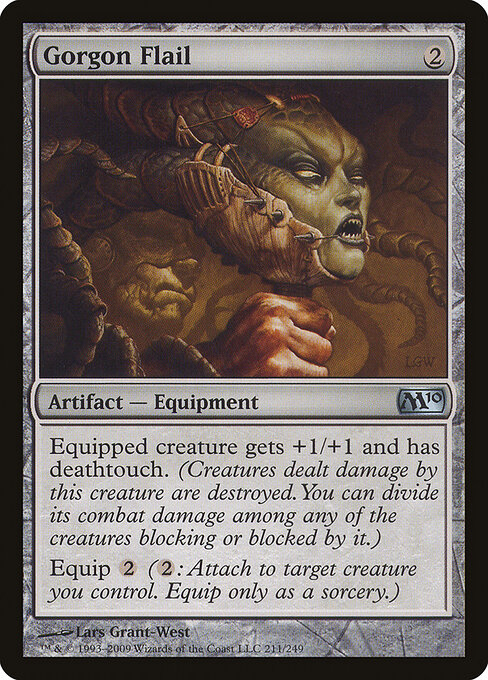
Gorgon FlailEnlarge

Gorgon Flail

{2}

Artifact — Equipment

Magic 2010

Read rules for Gorgon Flail
Equipped creature gets +1/+1 and has deathtouch. (Any amount of damage it deals to a creature is enough to destroy that creature.) Equip {2} ({2}: Attach to target creature you control. Equip only as a sorcery.)

Full card details & printings ›

Date Posted: Sun Apr/04/10 at 10:14 am

Burning_Shadows
Posts: 141
Joined: 28-Feb-10

http://www.wizards.com/mtg/images/daily/stf/stf84_jkgvbstyfdturbs.png

idk how to put in the actual picture but yeah
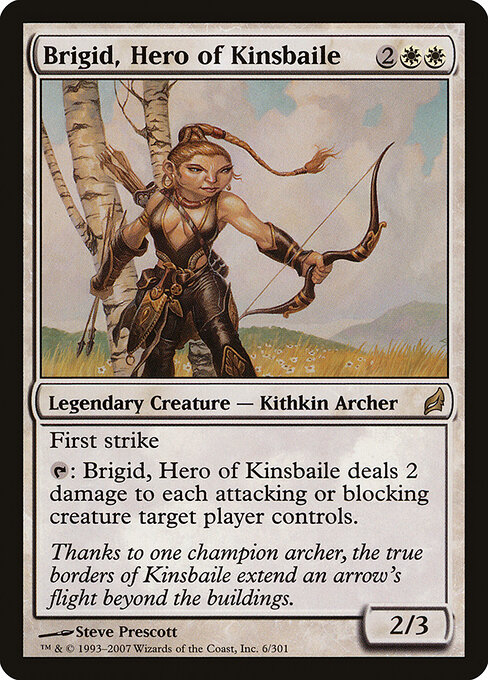
use his plus two ability and use brigid's ability,with gorgon's flail equipped, to kill them all
Date Posted: Sun Apr/04/10 at 10:44am

Turbine
Posts: 10194
Joined: 26-Oct-09


Also works with Suicidal Charge

[Edited by Turbine on 4/Apr/10 at 10:44AM]

[Edited by Turbine on 4/Apr/10 at 10:44AM]

[Edited by Turbine on 4/Apr/10 at 10:45AM]

[Edited by Turbine on 4/Apr/10 at 10:45AM]

[Edited by Turbine on 4/Apr/10 at 10:46AM]
Date Posted: Sun Apr/04/10 at 11:02am

Burning_Shadows
Posts: 141
Joined: 28-Feb-10

how do u put the direct picture in?
Date Posted: Sun Apr/04/10 at 11:04am

redringer8
Posts: 183
Joined: 28-Mar-10

i really dont know
Date Posted: Sun Apr/04/10 at 12:22pm

Turbine
Posts: 10194
Joined: 26-Oct-09

With Internet Explorer, you just copy and paste.

With Mozilla Firefox, you have to take the picture and drag it up to the tab bar so that an arrow appears. When you let go of the mouse, a new tab opens with only that picture on it. Copy the URL of that tab into the URL slot of the Insert Image pop-up. Set the dimensions to about 300 on both height and width, then press submit. Afterwords, you can re-size the picture by dragging at the corners.  


[Edited by Turbine on 4/Apr/10 at 12:23PM]
Date Posted: Sun Apr/04/10 at 12:32pm

Burning_Shadows
Posts: 141
Joined: 28-Feb-10

oh thats why...i use google chrome....pic insert feature isnt supported
shouldve known that one