Skip to content
MTGCombos
MenuClose

Share your combos and save your decks.

Join for freeLog in
Magic The Gathering Combos

Home     Submit A Combo     Deck Builder     Forums     Picture Guess     Help

You are not logged in [click to login] - [Join For Free!]  


significantly less convoluted infi turns

Hover a card name for a preview. Tap or click an image to zoom, or open its rules below.

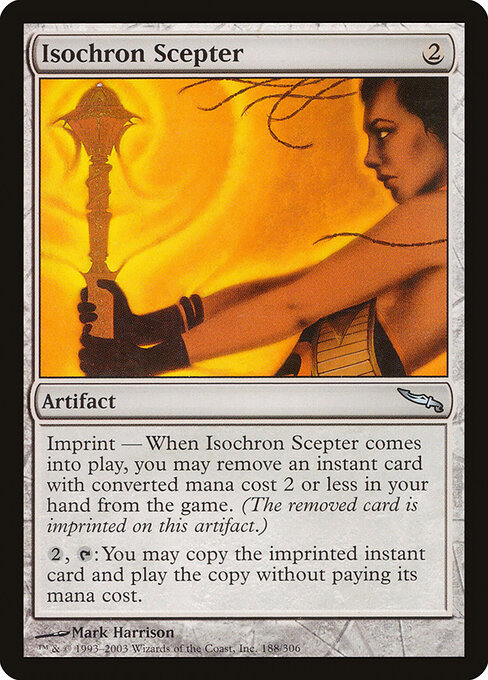
Isochron ScepterEnlarge

Isochron Scepter

{2}

Artifact

Mirrodin

Read rules for Isochron Scepter
Imprint — When this artifact enters, you may exile an instant card with mana value 2 or less from your hand. {2}, {T}: You may copy the exiled card. If you do, you may cast the copy without paying its mana cost.

Full card details & printings ›

Date Posted: Sun Jan/01/12 at 1:34 am

PinkiePie
Posts: 157
Joined: 10-Sep-11

Losing is for losers!

EDIT: WAIT! WHERE DID PLATINUM ANGEL GO?!
derp

[Edited by PinkiePie on 1/Jan/12 at 1:36AM]
Date Posted: Sun Jan/01/12 at 1:41am

Turbine
Posts: 10194
Joined: 26-Oct-09

I know where it went:

http://www.mtgcombos.com/view.php?fid=2&tid=3678

(Sorry I can't link it. Stupid Chrome)
Date Posted: Sun Jan/01/12 at 1:51am

PinkiePie
Posts: 157
Joined: 10-Sep-11

Well, i was surprised that it hadnt been posted before...! That explains it!
Date Posted: Sun Jan/01/12 at 9:35am

darthnefas
Posts: 1081
Joined: 04-Apr-11

I got that same Chrome problem. I should use Netscape at work.
Date Posted: Sun Jan/01/12 at 1:19pm

Draco_lich
Posts: 1073
Joined: 07-May-10

infinite turns

i use chrome too (the only browser i use)
Date Posted: Sun Jan/01/12 at 1:30pm

Draco_lich
Posts: 1073
Joined: 07-May-10

the issue isnt chrome, it is the link you were trying to make... simply posting the address isn't a link when using this site, because there is some glitch with it, but if you tinker enough, then the links will work

to make a link work in chrome on this site

~~~~~~TITLE~~~~~~


copy that line

replace web address with your web address you want to use

replace title with the title that needs to be there

remove all the ~~~ from the line (they were put in only to prevent the site from seeing that as a link this time)
Date Posted: Sun Jan/01/12 at 1:30pm

Draco_lich
Posts: 1073
Joined: 07-May-10

the issue isnt chrome, it is the link you were trying to make... simply posting the address isn't a link when using this site, because there is some glitch with it, but if you tinker enough, then the links will work

to make a link work in chrome on this site

~~~~~~TITLE~~~~~~


copy that line

replace web address with your web address you want to use

replace title with the title that needs to be there

remove all the ~~~ from the line (they were put in only to prevent the site from seeing that as a link this time)
Date Posted: Sun Jan/01/12 at 1:38pm

Draco_lich
Posts: 1073
Joined: 07-May-10

ok, the ~~~ in the link to prevent it from working as a link didnt succeed

try this then...

1)

___YOUR TITLE___

copy that into your text for a link...

2)

replace web address with the address you want to send people to
replace your title to with the title the link is supposed to have

3)

remove all ___ from the link

4) post


(i hope this time it doesnt see it as a link)
Date Posted: Sun Jan/01/12 at 1:40pm

Draco_lich
Posts: 1073
Joined: 07-May-10

there should only be 1 space between "a href

and spaces in the title... otherwise, no spaces

(thought i would put that reminder in)
Date Posted: Mon Jan/02/12 at 12:20pm

darthnefas
Posts: 1081
Joined: 04-Apr-11

The problem is that Chrome doesn't support WYWS... whatever code and that means you can't have your little cheat bar to add pictures.

I don't ever click on links on forums. I like my computer virusless.
Date Posted: Mon Jan/02/12 at 2:01pm

Turbine
Posts: 10194
Joined: 26-Oct-09

This forum is pretty safe.

I usually use Firefox, so I should be fine.
Date Posted: Mon Jan/02/12 at 4:46pm

T}{3 0l\l3 VV}{0 1S
Posts: 178
Joined: 10-Jun-11

Yay, Foxes!

Also, I just highlight my words, and hit the hyperlink button. (shaped like earth with a chain underneath)
Date Posted: Mon Jan/02/12 at 6:28pm

Turbine
Posts: 10194
Joined: 26-Oct-09

That only works in Firefox though (and maybe IE).
Date Posted: Mon Jan/02/12 at 7:32pm

darthnefas
Posts: 1081
Joined: 04-Apr-11

Yes, the box works in Firefox (and it's partners) and Inet Explorer. I haven't tested Safari or other more Chrome level protected browsers.
Date Posted: Mon Jan/02/12 at 7:34pm

Turbine
Posts: 10194
Joined: 26-Oct-09

Doesn't work in Firefox or Chrome.


©2006-2026 MTGCombos.com

As an Amazon Associate I earn from qualifying purchases.